[Part 2] The Era of Bringing AI Assistants Into Your Own Data Center Has Arrived: UbiGPT × UbiCode × UbiWork On-Premise Enterprise AI Collaboration Solution
26-08-26
Author: Isaac, AI and Cybersecurity R&D Director | Editor: Helen, Deputy MKT Manager
Preface: From “Why Self-Host?” to “How to Implement?”
In the previous article, we discussed that as open-weight models gradually cross the threshold of “deliverable output,” the core issue for enterprise AI adoption is no longer simply whether the model is powerful enough. Instead, it is whether data can remain within the company’s own boundaries, whether inference costs are predictable, and whether AI can truly enter daily workflows.
For enterprises, the value of On-Premise AI is not merely “placing models inside their own data center.” It is about allowing contracts, sales data, project source code, internal documents, and infrastructure information to be securely read, analyzed, and executed by AI without leaving the corporate network. When data sovereignty, cost structure, and trust in usage return to the enterprise, AI has the opportunity to evolve from a one-time Q&A tool into an internal infrastructure that can be governed, scaled, and continuously optimized.
But the real challenge is: how can enterprises actually implement this?
An On-Premise AI system suitable for production cannot simply be a model service that has been started up, nor can it rely on handing out a shared API Key to the team. It must handle model inference, identity authentication, key governance, Agent execution environments, cross-department collaboration interfaces, usage records, cost attribution, and cybersecurity audits at the same time.
Therefore, this second part begins with the solution architecture, breaking down how Ubitus turns On-Premise AI from a concept into an enterprise-ready collaboration system through the three-layer platform of UbiGPT, UbiCode, and UbiWork.
4. Solution Architecture: A Three-Layer Breakdown

The three layers communicate only through standard protocols: UbiCode and UbiWork both access UbiGPT through an OpenAI-compatible API.
This design brings two advantages. First, the underlying model can be replaced at any time. The system may run Model A today and switch to a more capable Model B next quarter, while front-end users feel no difference. Second, multiple model tiers can be mounted behind the same endpoint, allowing the upper layers to select the most suitable model based on task type. This is exactly the foundation that enables the role-based Agent architecture in the next section.
5. Inference Layer: UbiGPT
When most teams self-host an LLM, their first version is usually “start the model service and give everyone a shared API Key.” This works during the PoC stage, but once it enters a production environment, three problems immediately appear: it becomes impossible to tell who is using it, difficult to block residual keys from departing employees, and impossible to calculate cost attribution for each team.
UbiGPT combines “model service” and “enterprise identity governance” into a single layer. This is what differentiates it from simply running an inference container.
5.1 Model Service
- OpenAI-compatible endpoint — Upper-layer tools can connect with zero modification, and existing ecosystems such as SDKs, CI scripts, and third-party plugins can all be used.
- Multi-model routing — Multiple model tiers can be mounted behind the same endpoint, including lightweight high-speed models, standard models, advanced reasoning models, and multimodal models. Routing can be based on team, project, or Agent role. Highly confidential projects can be forced to use internal models, while specific non-confidential projects may be allowed to access external providers through centrally managed policies. This is the prerequisite for the role-to-model matching discussed in Chapter 6.
- Long-context support — Agentic coding requires far longer context than ordinary Q&A. In practice, 128K context is the starting point.
- Prefix caching — Each round of Agent execution usually carries nearly identical system prompts and project context, resulting in extremely high cache hit rates. This is one of the highest ROI optimizations in a self-hosted environment and can improve throughput by several times.
5.2 Enterprise Authentication: Ready to Use and Compatible With Existing Directories
UbiGPT’s authentication layer is built on mainstream IdP standards and does not require enterprises to modify their existing identity architecture in order to adopt AI.
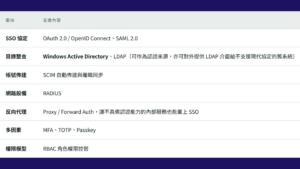
In practice, the most critical factor is AD synchronization. A user’s department, group, and employment status come directly from the company’s existing AD. When an employee account is disabled, all of that person’s API Keys are invalidated at the same time. This solves one of the most common security gaps in self-hosted AI services: shared keys scattered across individual .env files that never expire.
5.3 API Key Issuance and Usage Governance
- Key lifecycle management — Keys can be issued by user or service account, with configurable expiration dates, project binding, and immediate revocation.
- Usage statistics and cost attribution — Every call records the user, model, token count, and timestamp. Reports can be generated by department, project, or individual. Even when self-hosting turns inference into a fixed cost, internal cost allocation and ROI justification still require this data.
- Quota and rate limits — Prevent a single runaway automation task from consuming the entire cluster’s throughput.
- Audit logs — Centralized call records support both cybersecurity audits and cost analysis.
5.4 Conversation Record Retention: Turning Usage History Into an Enterprise Asset
UbiGPT provides optional conversation record retention. On the surface, this function is for auditing, but its true value lies elsewhere.
Human correction and feedback to AI are among the best possible data sources for fine-tuning models.
Public datasets can teach models general knowledge, but they cannot teach them “how our company works.” Every time an engineer interrupts AI and says, “No, this should use our internal component, not the open-source one,” every time a legal colleague modifies AI’s clause suggestion and explains why, and every time a senior architect rejects a seemingly reasonable design, these are all high-quality labeled data created by domain experts in real work contexts.
This data is special because:
- It comes in pairs — Every correction naturally forms a comparison between “a not-good-enough answer” and “a better answer,” which is exactly the structure needed for preference fine-tuning.
- It includes reasoning — When humans correct AI, they usually explain why, which is far more valuable than a simple right-or-wrong label.
- It cannot be purchased — You can buy generic programming datasets, but there is nowhere to buy “the correct way to use your company’s internal framework” or “your company’s standard position on a specific type of contract clause.”
- It generates itself — No additional labeling budget is required. It is a byproduct of daily team work.
The retained records can be used in three ways:
- Fine-tuning domain-specific models — Train dedicated models that truly understand the company’s internal frameworks, coding style, business terminology, and decision-making conventions. This is especially valuable for internal proprietary toolchains. No matter how strong external models are, they have never read your internal systems.
- Building internal evaluation sets — Turn previously corrected cases into a regression test set. When replacing models in the future, run this set first. Validating against real pitfalls is far more reliable than relying on public leaderboards.
- Extracting rules and prompt assets — Not every improvement requires retraining. High-frequency corrections can be written directly into project rule files or role prompts. This is low-cost and immediately effective.
In programming, this data has a second source: git history itself. UbiCode marks output sources in commit metadata, as described in Section 6.6. Therefore, changes where “AI-generated output was later modified by humans” can be automatically retrieved. This is ready-made training signal that requires no additional labeling.
This creates a flywheel: the more the system is used, the more corrections accumulate; the more corrections accumulate, the better the model understands the company; the better it becomes, the more people use it. Even if competitors start from the same open-source model, they cannot copy the data your company accumulates.
This can only be done in a self-hosted environment. With a third-party API, you cannot retrieve complete interaction records, nor can you use the data to train a model that belongs to you. The direction of the data flow is reversed: your feedback helps improve someone else’s model. In a self-hosted environment, records already exist in your own database, training runs on your own GPUs, and the entire data chain from creation and storage to training never leaves the company.
Of course, this function must be paired with governance measures: it should be off by default, enabled selectively by team or project, clearly disclosed to users, filtered automatically for credentials and other sensitive content, given a retention period, and de-identified before being included in training. See Chapter 9 for details.
6. Agent Layer: UbiCode
6.1 From “One All-Purpose Assistant” to “A Specialized AI Team”
Early coding agents mostly did one thing: one model, one role, from beginning to end. More advanced versions may distinguish between “planning” and “execution.” But real development work is not binary. “Finding every place where an API is called across 3,000 files” and “deciding whether an architecture should be split apart” are completely different types of tasks, yet they are often given to the same model.
This is inefficient on both sides. Using an advanced reasoning model for large-scale file scanning means using the most expensive compute for the most mechanical work. Using a lightweight model for architectural decisions, on the other hand, produces answers that look reasonable but cannot withstand scrutiny.
UbiCode adopts a role-based Agent team. Each role has clear responsibilities, a dedicated system prompt, a defined tool scope, and a suitable model tier. A central orchestration role decomposes tasks, assigns them to the appropriate specialists for parallel processing, and then consolidates the results.
6.2 Role Structure
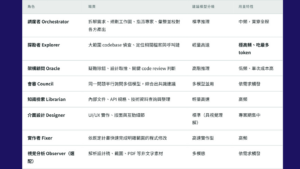
The most important column in the role table is “usage characteristics.” The Explorer usually consumes the largest share of tokens, but its task actually only requires a lightweight model. The Oracle has the highest per-call cost, but may only be invoked a few times a day.
Assigning each role to a model tier that is just powerful enough can reduce total cost by several times compared with using the strongest model for everything, while output quality is barely affected. In some cases, quality may even improve because specialized prompts are more precise than general prompts.
This is exactly why UbiGPT’s multi-model routing matters. Different model tiers can sit behind the same internal endpoint, and UbiCode automatically selects the appropriate model by role. Lightweight models can be deployed in lower-cost inference resource pools, while advanced models can be concentrated on a smaller number of high-end nodes, greatly improving overall GPU utilization.
6.3 Scheduling and Collaboration
- Background parallel execution — The orchestrator uses a “schedule-first” workflow, assigning multiple expert roles as background tasks that run simultaneously, tracking their progress, and moving to the next stage after convergence. This makes naturally independent tasks such as exploration, document lookup, and reading existing tests truly parallel.
- Manual assignment — Users can directly call a specific role, such as asking @oracle whether a lock design has a race condition. This skips the orchestration process and applies the strongest reasoning capability precisely where needed.
- Multi-model council — At key decision points, council mode can be triggered so multiple models answer the same question independently. The system then synthesizes consensus and differences. In a self-hosted environment, this is especially cost-effective because low marginal cost allows multiple inferences on important decisions.
- Structured long workflows — For large-scale changes, UbiCode provides multi-stage workflows such as inventory, planning, validation path design, implementation, and convergence, rather than letting the Agent write straight through from start to finish.
- Switchable model presets — The same role structure can be bound to different model combinations and switched at runtime with one click. Daily development can use an economical preset, while critical releases can use a higher-end preset. When models are upgraded, only the preset needs to be updated, with zero changes for users.
6.4 Capabilities and Permissions: Role-Based Control
Another benefit of role-based design is more granular permission control. UbiCode’s Skills and MCP tools are authorized by role:
- Skill and MCP access follows a whitelist model, with wildcard authorization * or explicit denial !skill-name available for fine-grained adjustment.
- Explorers and knowledge retrieval roles naturally do not have file write capability. This is not controlled by prompts; the tools are simply not available to them.
- Only implementers and orchestrators can trigger changes. Destructive commands always require human approval.
- Database query MCPs can be made available only to the Oracle, not to high-frequency execution roles.
Compared with “one all-powerful Agent plus a long list of prohibitions,” limiting capabilities through the natural boundaries of role responsibilities is a more reliable security model.
6.5 Execution Environment: Lightweight VM Sandbox Makes “Letting Go” Feasible
Role permissions solve the question of which tools an Agent can use, but there is another layer: whose machine executes the Agent’s commands, and what files can it touch?
The UbiCode client is delivered as a Docker image, with a default environment that is consistent across Windows, macOS, and Linux. The Agent’s actual execution takes place inside a lightweight VM, rather than directly on the user’s host machine.
Only the necessary files and permissions are exposed:
- Only the project directory needed for the current task is mounted. All other file systems do not exist from the Agent’s perspective. It cannot see your home directory, SSH keys, browser settings, or other projects.
- Network access follows a whitelist model. External connections are blocked by default, with only internal package mirrors and the UbiGPT endpoint allowed.
- System-level operations are restricted inside the VM, leaving the host machine unaffected.
This brings four practical benefits:
- The blast radius is reduced — Whether due to model misjudgment, incorrect command parameters, or prompt injection triggered by malicious content, the maximum damage is breaking a disposable VM that can be rebuilt at any time.
- The environment is fully consistent — The classic “it works on my machine” problem disappears. Engineers’ local machines, colleagues’ machines, and CI runners all use the same image, making Agent outputs reproducible.
- New team members can start in one day — Instead of spending three hours following environment setup documents, they can pull an image and get a complete working environment.
- Teams can truly let the Agent run — This is the most important point.
The fourth point deserves further discussion. Agent efficiency comes from continuous execution: reading files, modifying files, running tests, checking results, and fixing again in one uninterrupted flow. But if every shell command requires a human to click “approve,” the workflow degenerates into a very slow chatbot. Engineers may spend more attention on approvals than they would spend doing the work themselves.
Teams then face a dilemma: full openness risks accidents, while full control removes the value.
Sandboxing solves this problem. When the execution environment is isolated and disposable, allowing the Agent to run continuously becomes a reasonable default rather than a courageous decision. Users can hand off tasks, work on something else, and return to check the results without worry.
Together with the role permissions in Section 6.4, this forms two layers of protection, each governing a different issue.

Neither layer is sufficient on its own. With only role permissions, a manipulated implementer role might still damage the host machine. With only a sandbox, the Agent can still do things it should not do inside the project directory. Only by combining both layers can the system support “letting it run.”
6.6 Traceability: Using git Metadata to Mark Human and AI Output
When AI starts producing large amounts of code, a new question arises: six months later, can you tell which lines were written by humans and which were written by AI?
Most teams cannot. This becomes a problem at three moments: during audits, when incidents happen, and when trying to evaluate how well AI is actually performing.
UbiCode writes source information into git metadata, using commit trailers and git notes to record the source of each change along with necessary context:
- Who generated it — Human-written, AI-generated, or AI-generated and then modified by humans. The third case is actually the most common.
- Which role and model — Whether the output came from the implementer or the Oracle, and which model and version were used.
- What reviews it passed — Whether it passed automatic review and who approved the merge.
The key is that this information is written at the metadata layer. It does not pollute commit messages, does not change diff content, and does not affect existing git blame or code review workflows. Existing toolchains require no adjustment. The information quietly accumulates in the background.
Why is this worth doing?
- Compliance and delivery declarations — More customer contracts and tenders are starting to require disclosure of AI-generated content scope, or even explicitly restrict AI-generated output from entering certain deliverables. With per-commit source marking, this becomes a simple git log query. Without it, it becomes archaeology.
- Incident investigation has a trail — When production issues occur, teams can immediately answer: which model, which version, and under what context produced this code, and whether it went through human review. This determines whether you are fixing one line of code or a process that will keep reproducing the same mistake.
- Use data to decide trust boundaries — Teams can calculate the revert rate of AI-generated output, the proportion of changes requested during review, and later defect density by module. Based on data, they can decide which task types can be delegated and which still need strict control. This is far more constructive than debating AI trustworthiness based on intuition.
- Intellectual property risk scoping — If a licensing dispute occurs, the affected scope can be clearly identified instead of putting the entire repository under uncertainty.
- Feeding models back — This echoes Section 5.4. Commits where “AI-generated output was later modified by humans” are ready-made training signals. The left side is the model’s output, the right side is the expert-approved version, and the commit message often explains the reason. No additional labeling is needed; git history itself becomes a dataset.
The fifth point deserves special attention. As mentioned earlier, human correction is some of the best fine-tuning data, and git metadata makes these corrections automatically identifiable. The system knows which diffs represent “humans correcting AI” and which are ordinary iterative development. Without source marking, this valuable data is mixed into hundreds of thousands of commits and cannot be extracted.
6.7 Common Capabilities
Regardless of interface, UbiCode provides the same foundational capabilities:
- Deep LSP integration — Uses the Language Server to obtain real type information and symbol definitions, rather than relying only on text matching. In large projects, this significantly improves modification accuracy.
- MCP extension — Internal systems such as issue trackers, GitLab, internal API documentation, and read-only database queries can be connected through standard protocols, allowing Agents to access enterprise context without leaving the internal network.
- Project rule files — Team architecture conventions, naming rules, banned packages, and test commands can be written into rule files inside the repository and version controlled. This becomes an executable version of the team’s engineering standards, ensuring consistent Agent behavior across engineers.
- Git worktree isolation — Long-running or high-risk tasks can be executed in isolated worktrees without interfering with the current branch.
- Headless mode and SDK — Can run in non-interactive environments and be embedded directly into CI pipelines: automatic review when PRs are opened, nightly automatic test generation, and automatic attempted fixes when CI fails.
6.8 TUI: The Engineer’s Local Battlefield
The terminal interface runs on the engineer’s own machine and integrates seamlessly with existing shell, git, and editor workflows.
- Roles can be called directly using @role, or assigned automatically by the orchestrator. Background task progress is tracked in the same screen.
- Model presets can be switched with one click to adjust the tradeoff between cost and quality in real time.
- It stays close to shell and git, making it scriptable and CI-runner friendly.
- It is suitable for minute-level interactive iteration: feature development, debugging, test execution, and pre-commit checks.
6.9 WebUI and Native Apps: The Team’s Collaboration and Review Space
The browser interface and desktop/mobile native apps handle what TUI is not naturally good at: cross-device continuity, long-running tasks, and team-level review.
- Session Goals — Once a goal is set, the Agent continues working even if the window is closed or the user switches devices. This is suitable for large migrations, framework upgrades, and cross-module refactoring that require hours or days.
- Parallel solution exploration — Unlike the council mechanism, this allows several models to each complete a full implementation for the same requirement in separate sessions or git worktrees. The best parts of each version are then merged into a new session. In a self-hosted environment, this is especially worthwhile because low marginal cost allows teams to “run several options and choose the best,” something teams hesitate to do under token pricing.
- Visual tracking of role outputs — Background task status, dependencies between roles, and stage outputs are shown in one screen. Tech Leads can understand what the entire AI team is doing without entering the terminal.
- Changes Walkthrough — Large diffs are transformed into AI-guided explanations, grouped logically with explanations of how changes relate to one another. This directly addresses one of the biggest bottlenecks in AI-assisted development: output is generated far faster than humans can review it.
- Live preview — The running application is displayed beside the conversation, allowing users to compare visual elements with corresponding code changes.
- Version control platform integration — Work sessions can be opened directly from issues or PRs with full context. Failed CI checks and review comments can be sent back to the Agent, and PRs can be updated or merged directly from the interface.
- Cross-device access — Desktop on Windows, macOS, and Linux; browser/PWA; IDE extensions; iOS and Android. Work sessions continue across devices.
- Multiple connection methods determined by security policy — This is an important configuration point for on-premise deployment.
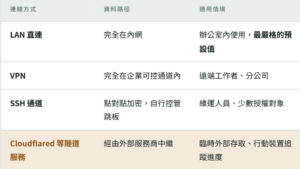
The last option provides the most convenience: no need to open firewall ports, no need for fixed IPs, and scanning a QR code is enough to connect to an internal work session from a phone. However, it also means traffic passes through a third-party edge node. Although the connection itself is encrypted, whether this path complies with the company’s cybersecurity policy must be assessed by the security team and should not be enabled by developers on their own.
A practical recommendation: disable tunneling by default and use LAN/VPN as the standard connection methods. If cross-network access is truly needed, approve it case by case according to project confidentiality level and include its status in regular audits. The existence of the feature is not the problem; the problem is the absence of clear rules about who can enable it and under what circumstances.
- Scheduled tasks — Repetitive tasks can be scheduled through cron or daily/weekly intervals.
- Work tracking and cost visualization — Sessions are organized by folder, with notes, to-do items, reusable project actions, approval requests, token usage, and cost all visible at a glance.
6.10 Choosing Between the Two Interfaces
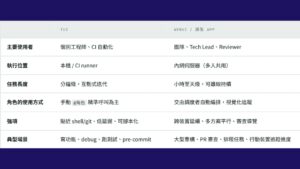
Practical recommendation: deploy both interfaces at the same time and share the same account and session system. Engineers use TUI on their own machines for daily development, while Tech Leads use WebUI to inspect the entire team’s Agent output and cost. When traveling, users can use the mobile app to check long-running task progress.
7. Collaboration Layer: UbiWork — An AI Coworker for People Who Do Not Write Code
When discussing AI adoption, the conversation almost always revolves around engineers. But once we shift our view away from R&D, one thing becomes clear: most repetitive document work in a company is not in R&D.
Legal teams review several contracts with similar formats every week. Sales teams restructure the same reports from different perspectives every month. Finance teams reconcile numbers across multiple spreadsheets. HR handles stacks of resumes and standardized announcements. PMs turn meeting transcripts into specifications and weekly reports. These tasks have three things in common: they are highly repetitive, follow clear formats, and consume a great deal of time.
They are also among the least supported by tools. Engineers have IDEs, CLIs, and various agents. These colleagues usually only have Office and a chat window. What they can paste in is limited, and confidential content often cannot be pasted at all.
UbiWork is designed for exactly these users. Its premise is that users do not need an engineering background, do not need to learn prompting techniques, and do not need to know which model is running behind the scenes.
7.1 Three Key Design Decisions
First: the output is a file, not a chat message.
This is the biggest difference between UbiWork and ordinary AI assistants, and it determines whether the tool will truly be adopted. When AI lists ten suggestions in a chat box, it looks useful. But what users need to do next is open Word, move each suggestion into the document, adjust formatting, and add comments. This transfer work often takes more time than the thinking itself.
UbiWork directly produces deliverable files: Word documents with tracked changes and comments, Excel spreadsheets with complete formatting and charts, and presentations with transition animations. Once confirmed, they can be sent out directly, with no manual transfer.
Second: drop in the file and assign the task in Chinese.
No need to build a pipeline first, import data into a BI system, or write formulas. Users can drag in a contract, a stack of reports, or a transcript, then describe what they need in everyday language. For non-technical users, adoption is often not a matter of willingness but whether the first step is too difficult.
Third: built-in roles instead of requiring users to write prompts.
The system provides built-in professional role templates, such as contract review, presentation creation, report analysis, and document writing. Users can select a role and begin without studying how to write effective prompts.
7.2 Capabilities
- Multi-Agent collaboration / Team Mode — Multiple AI roles divide work and run in parallel, rather than a single assistant processing tasks sequentially. For example, for a proposal, one role organizes data, another writes copy, and another formats the presentation.
- Office document generation — Presentations with transition animations, Word documents, and Excel spreadsheets with automatic formatting and charts, along with built-in professional role templates.
- File and data processing — Batch renaming, automatic archiving, intelligent classification, file merging, Excel data analysis, and report generation.
- 24/7 scheduled automation — Weekly reports, monthly reconciliation summaries, and regular data health checks can be set up once and run continuously, allowing managers to receive the latest summary first thing in the morning.
- Multi-format preview and multi-tab support — PDF, Word, Excel, presentations, Markdown, images, HTML, and diffs can all be previewed in one interface, with multiple tabs open for comparison. This is especially useful for tasks such as viewing an old contract and a new version side by side.
- Remote access — WebUI can be deployed on an internal server for company-wide use. If the enterprise already has an internal communication platform, integration can be evaluated to support mobile task assignment. Under strict on-premise policy, any outward communication channel should be evaluated by the security team before being enabled.
- Local data retention — All work sessions and files are stored locally and are not uploaded to external servers.
7.3 Three Reminders for Introducing AI to Non-R&D Departments
Compared with R&D teams, adoption in non-technical departments is more likely to get stuck at the “people” layer. Our own experience suggests:
- Start with repetitive tasks that have standard formats — Contract initial review, monthly report consolidation, and report analysis have clear standards for correctness. Users can quickly judge whether AI is performing well, and trust builds faster. In contrast, if the first use case is creative ideation or external copywriting, evaluation becomes subjective and controversial, making early support easier to lose.
- Human confirmation cannot be skipped — AI is the initial reviewer, not the decision-maker. Contract clauses, financial figures, and external documents all require named human approval. This is even more important outside R&D because these outputs often go directly outside the company and cannot be recalled once sent.
- Output format determines adoption rate — This point is worth repeating: files that can be sent directly will be used continuously. A list of suggestions that must be manually copied again will not. During implementation, ask first whether the output can be used directly, not merely whether the AI is correct.
The contract review and sales data analysis discussed in Chapter 3 are actual internal uses of UbiWork. The users are legal and sales colleagues, and no engineers participate in either scenario. This is exactly why this layer exists: the value of AI should not remain only in R&D.
8. Implementation Mapping: From Department Workflows to SDLC
8.1 Daily Work in Non-R&D Departments
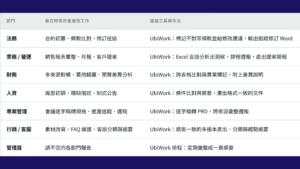
The common point across this table is that every output is a file, not a conversation. This is also why Chapter 7 lists “deliverable file output” as the first key design decision.
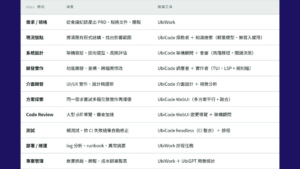
8.2 R&D: SDLC Stages
9. Governance: Self-Hosting Does Not Automatically Mean Security
Moving models into the machine room solves the problem of data leaving the organization, but it does not solve internal misuse or uncontrolled output. As users expand from R&D to legal, sales, and finance, the focus of governance also shifts. Engineers handle the company’s own code, while legal and sales teams handle customer data governed by the customer’s contract terms.
The following mechanisms must be established at the same time:
- Data classification and permitted usage scope — Clearly define which types of data can be given to AI, which must be de-identified first, and which are completely prohibited. This must be done before deployment, not after an incident. Pay special attention to files containing personal data and customer-identifiable information. Even if everything stays inside the internal network, such data is still subject to privacy laws and customer contracts. “No external leakage” does not mean “free to use.”
- Least privilege by role — Use UbiCode role permission policies so exploration and retrieval roles do not have write capabilities at the tool layer. Only implementation and orchestration roles can trigger changes. Destructive commands, production credentials, and external network requests are blocked by default, and high-risk operations require human approval. Limiting capability by responsibility boundaries is more reliable than relying on prompt reminders.
- Centralized identity and key management — All inference traffic must carry credentials traceable to a person and be issued and revoked centrally by UbiGPT. Any form of shared long-term key should be prohibited.
- Secrets isolation — The Agent’s working directory should not contain real credentials. Use a secret manager for injection and ensure sensitive files are in ignore lists.
- Sandboxed execution environment — Agents should always run in lightweight VMs, with only the directory required for the current task mounted. This downgrades the consequence of authorization mistakes from a security incident to rebuilding a container, as discussed in Section 6.5.
- Egress blocked by default — External network access from the Agent execution environment should be disabled by default. Required external resources such as package repositories and documentation should go through internal mirrors or whitelist proxies. This also blocks data exfiltration paths caused by prompt injection.
- Explicit remote access channel rules — Convenient features that may leave the internal network, such as UbiCode tunneling or UbiWork external communication integrations, must have clear enablement conditions and approval processes and be included in regular audits. They should be off by default.
- Awareness and sanitization of conversation records — If the record retention in Section 5.4 is enabled, users must be clearly informed which projects are recorded and for how long. Credentials, personal data, and customer-identifiable information must be automatically detected and removed. Before being included in training data, records must be de-identified and reviewed through human sampling. The ability to train models on your own data is an advantage, but only if the data itself is clean.
- Centralized audit logs — Who used which model, when, for what task, and how many tokens were consumed should all be recorded locally, supporting both cybersecurity audits and cost analysis.
- Full traceability of output sources — Code output should be marked as human- or AI-generated in git metadata, as described in Section 6.6. Document outputs should leave similar marks in file properties or internal version records. This is the line between “AI generates content at scale” and “that content remains governable.”
- External outputs must be approved by humans — AI-generated contract revisions, customer proposals, external announcements, and financial figures must all be confirmed by a named human before being sent. Code merges can be reverted; sent documents cannot. This control point is even more valuable than its counterpart in code.
- Humans remain the final checkpoint — Whether merging, sending, or publishing externally, Agents may open PRs and generate documents, but humans must make the final decision. Tools such as change walkthroughs and risk flags help humans review faster; they do not replace review.
10. Implementation Roadmap
Phase 1: PoC, 2–4 Weeks
Deploy UbiGPT on a single GPU node and connect it to the company AD to complete SSO. Three to five senior engineers can connect after pulling the UbiCode Docker image. The client side does not require any changes to anyone’s local environment for the PoC, which also makes it costless to remove everything if the trial is unsatisfactory.
The goal is not to verify whether “AI is useful,” but to measure the model’s actual performance and throughput ceiling on your own codebase. At the same time, establish a baseline: the actual monthly spending and token usage of the current solution.
Phase 2: Pilot, 1–2 Months
Expand to a single team of 10–20 people. Deploy UbiCode WebUI for session management and code review, write the first version of project rule files, and enable UbiGPT department-level usage statistics.
The key task in this stage is tuning the mapping between roles and models. Based on actual usage data, determine which roles can be downgraded to lighter models and which deserve upgrades, then solidify the model combination into defaults suitable for your company. This stage also begins to reveal the real break-even point.
Phase 3: Expansion
Expand inference nodes based on stress test results, introduce UbiWork for non-engineering roles, and turn scheduled tasks such as daily log analysis, weekly reports, and automatic CI failure fixes into routine operations. At this stage, SLAs, monitoring, and model upgrade processes must be formalized.
Conceptual hardware reference: for mainstream open-weight coding models, including MoE architectures, a single 8-GPU node with prefix caching enabled can usually support daily agentic traffic for dozens of engineers. However, concurrent throughput depends heavily on model size, context length, and task type. Always test with your own workload and do not directly apply numbers from others.
11. Common Concerns
Q: Can self-hosted models keep up in capability?
This is the most common question and also the one changing the fastest. For the hardest tasks, such as large-scale architectural refactoring, top commercial models still have advantages, but the gap is narrowing, and the direction of narrowing is one-way. For the vast majority of daily work, such as understanding existing code, generating tests, renaming across files, fixing CI errors, reading contracts, and analyzing reports, today’s open-weight models are already consistently capable.
The role-based architecture provides a more precise solution: the capability gap is concentrated in the Oracle role, while other roles are fully sufficient with internal models. A practical approach is hybrid deployment: default everything to internal models, and only allow advanced reasoning roles in specific non-confidential projects to access external providers, centrally controlled by UbiGPT’s routing policies rather than left to individual engineers.
This is also a question worth revisiting every six months. Given the speed of open-weight model progress over the past two years, the small piece that requires external providers today may no longer need them next year. When that happens, you will be glad the architecture was already prepared and only one routing setting needs to change.
Q: Will operations costs eat up the savings?
They will consume part of the savings, so MLOps staffing, machine room costs, and electricity must be included in calculations. This is also why small teams should not force on-premise deployment too early. The break-even point generally appears when usage is stable and continues to grow.
Q: What happens when models are updated?
This is exactly the value of having upper layers recognize only standard protocols. When a new model is released, run it against your regression test set on a staging node. After it passes, update the model preset for the corresponding role, with zero changes on the user side.
Role-based architecture also allows gradual validation. You can first replace only the Explorer model and observe for a week before deciding whether to replace the Implementer. This is much lower risk than switching everything at once. It is recommended to maintain an internal programming task evaluation set, which will reflect actual needs far better than any public leaderboard.
Q: Do all three layers have to be adopted?
Not necessarily, but it is recommended to start with UbiGPT at minimum. Authentication, key governance, and usage management are the common foundation for all subsequent AI applications. Once this layer is done correctly, any future AI application can reuse the same identity and audit mechanisms, instead of adding another uncontrolled set of API Keys with every new tool.
Conclusion
Returning to the opening line: when open-weight models evolve from interns to full-time employees with master’s or doctoral-level capabilities, the premise that “self-hosting equals compromise” no longer holds. Once enterprises no longer need to compromise on capability, the only remaining question is: whose office should this full-time employee sit in?
On-Premise LLM is not a technical regression for the sake of saving money. It is about turning AI assistants from “an external service” into “an internal infrastructure.” When inference, identity, Agent execution, and collaboration interfaces all operate within your own boundaries, you gain four things: data sovereignty that does not depend on someone else’s terms, a predictable cost curve that does not punish high-frequency use, long-term control over models and toolchains, and—most importantly—the professional judgment accumulated by your team every day can truly settle into your company’s own model capability instead of flowing into someone else’s training data.
UbiGPT keeps models and identity governance securely inside the internal network. UbiCode transforms AI assistants from “all-purpose but expensive generalists” into a specialized AI team with clear roles and suitable model assignments, while giving engineers and Tech Leads the interfaces that best fit their workflows. UbiWork extends AI collaboration to the entire product team. All three layers run in your own machine room. What remains is deciding when to begin.
About Ubitus
As a member of the NVIDIA Connect program, Ubitus leverages NVIDIA’s support and cutting-edge GPU technology to accelerate AI innovation. The company delivers advanced AI solutions, including UbiGPT (a large language model), UbiONE (an AI-powered avatar creation platform), and UbiArt (an image generation tool), providing customized solutions to meet the diverse needs of various industries.
As a cloud gaming pioneer, Ubitus enables Nintendo and other game companies to establish cloud gaming services and supports the global streaming of multimedia content, including interactive and virtual reality experiences.
Contact
TEL : +886-2-2717-6123 (Taipei)
+81-3-6435-3295 (Tokyo)
Media contact: pr@ubitus.ai
Business inquiry: contact@ubitus.ai
Website:www.ubitus.ai